UPDATE 2026-03-24: I will be removing this post in the near future, and replacing it with the updated Linux problems post + putting the MusicBee-specific parts elsewhere (like a “things I use” page). Things have changed a bit.
Introduction
A month ago, I wrote a quick post about me leaving Linux to go back to Windows. I have since been quite annoyed by Windows’ userland. Barring issues relating to drives and firmware, Windows does feel annoying to use compared to the major two Linux distributions, and if anything the surface-level annoyance on Linux comes from its very ideological community that is the least helpful of the three “major” operating systems.
At the same time, I’ve been able to think a bit more clearly about what was really keeping me away from Linux, and the main thing appears to be MusicBee. But it’s a bit more than just not having a MusicBee equivalent and I want to explain the full context of it and why ultimately, the best option was to stay on Windows for one single music player.
Why I Use MusicBee
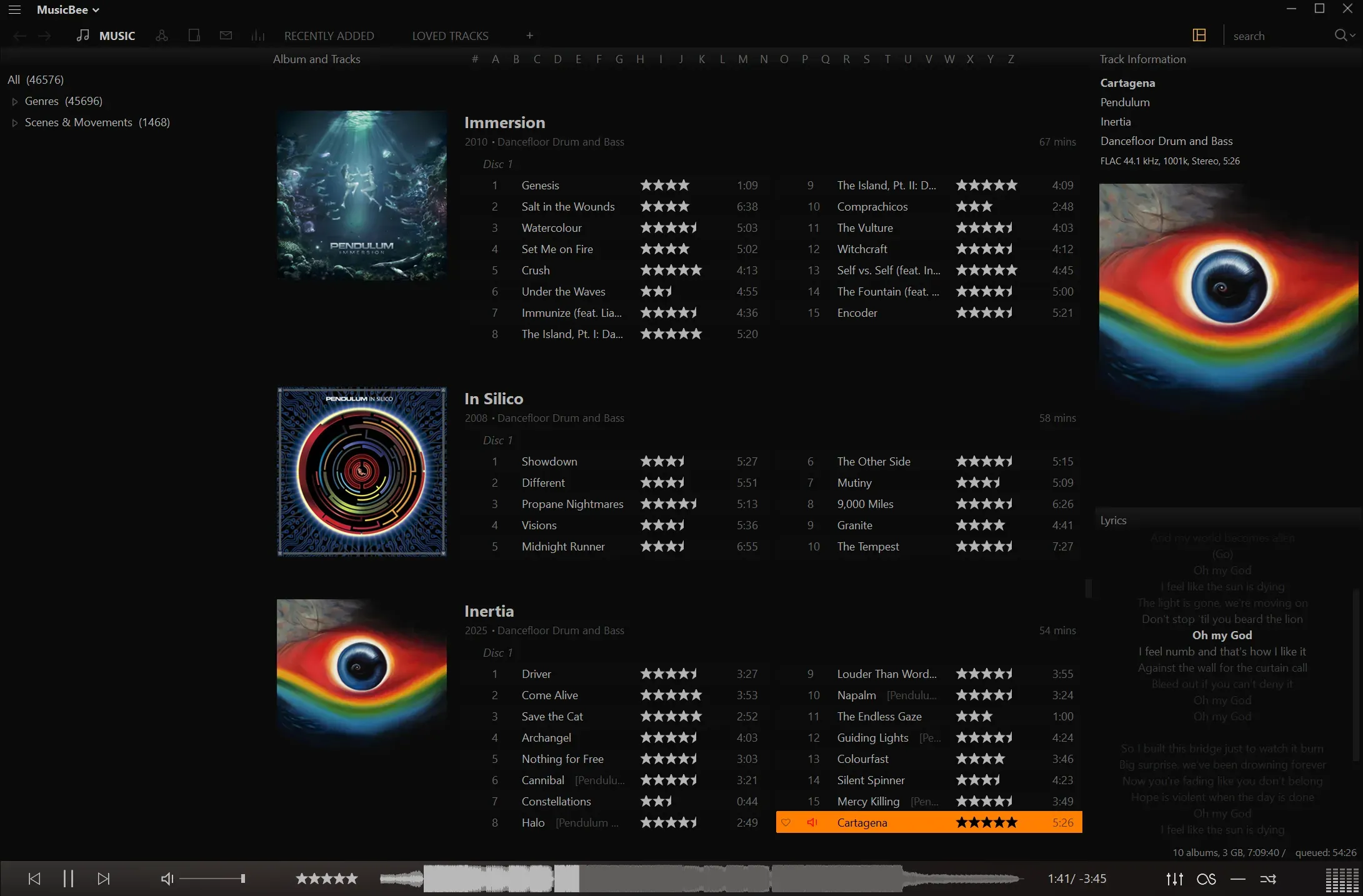
MusicBee is basically like having your own advanced digital jukebox, and for that reason, it’s the best music library organiser and player in my opinion. Some of the features I make use of include:
- playlists, with nested folders
- auto-playlists and library filters
- customisable playlist views
- placing newly added files into an inbox before actually hitting the library
- support for custom tags
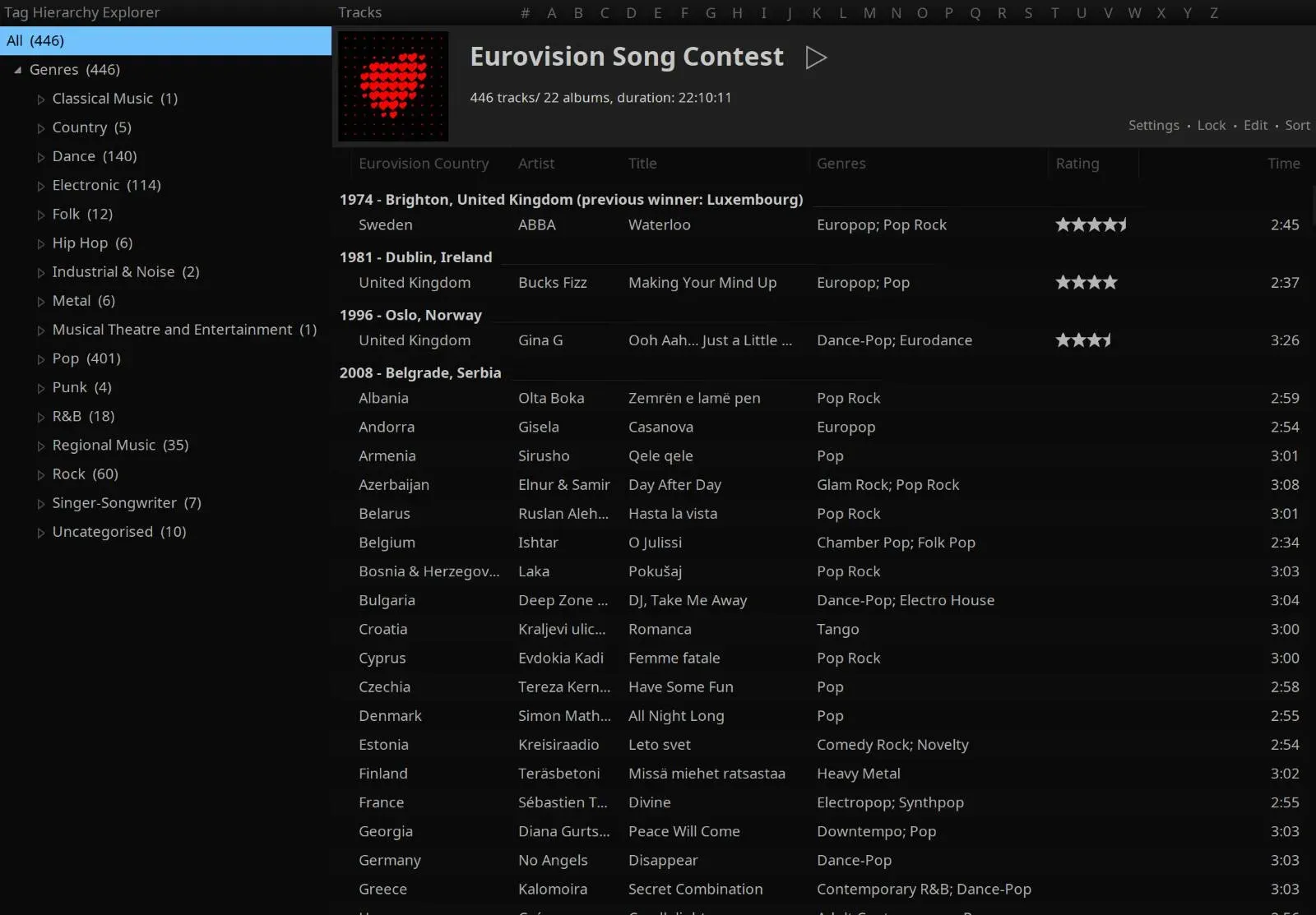
However the one feature I love about MusicBee is the Tag Hierarchy Explorer. Using a simple text file as a template, you can have your library organised basically however you want. I maintain a weekly-updated template based on the genres and scenes & movements trees from Rate Your Music, and this essentially allows me to have my own little radio stations for whatever genre(s) in the tree that I want, based on the music I wanted.
You’re not limited to genres, either. Since MusicBee also allows for custom tags, you’re also allowed to use whatever tags you want for the tag hierarchy template once you’ve added them. Say you want to organise your library of video game music by the console it was made for. You could have a tree that looks like this:
By Bits 8-bit Nintendo Entertainment System::console SEGA Master System::console ... 16-bit SEGA Mega Drive::console Super Nintendo::console ...It allows for an intuitive yet very customisable method of filtering and organising your music library. You could also have another part of the tree that only grabs Nintendo consoles, or even use the sound chip instead of the console, or use the Tag Hierarchy Explorer on a single playlist, if you wanted. It turns MusicBee from just a nice iTunes-esque music player to basically iTunes on steroids.
With all of these features, I’m pretty well-tied to MusicBee. It works really well for me. However there’s one glaring problem: MusicBee is only for Windows, and there are no plans to port it to Linux, the operating system I actually want to main. My options to deal with this were:
- running it in WINE
- running it in a virtual machine
- giving up and using the native alternatives
Spoilers, none of these were viable - they all annoyed me and simply made me use music streaming more.
Running it in WINE
A lot of people now know WINE as one of the components that make up Proton, Valve’s framework that has pushed gaming to the Linux desktop. And MusicBee, for the most part, does work in WINE. Sort of. There are some things that are broken:
- Font redirection for Unicode characters: While East Asian scripts were fixed in 2024, other Unicode characters like full-width letters and mathematical bold/italic letters (tends to be used in the vaporwave scene) still don’t get re-directed.
- Tabs cannot be dragged: Dragging tabs results in nothing. It’s better than erroring whenever a user drags a tab as it did in the past, but it’s still desirable to have these things working.
- Certain album art does not display whatsoever: This has something to do with when WINE uses Windows’ native rendering libraries, and seems to occur mainly with cover art downloaded from MusicBrainz’s Cover Art Archive. Since MusicBrainz is full of obsessive music nerds, I figure it’s to do with something like resolutions being too high. (Using WINE’s version of the rendering library will result in an uglier MusicBee. Don’t use it.)
The above are pretty manageable, with workarounds like using regular letters or using lower-resolution album art. What has made it frustrating for me were issues with the clipboard being very janky, and desktop environments not coping with how MusicBee handles tab changes. The clipboard would sometimes just not work, leading to me copy-pasting an older bit of text into MusicBee’s clipboard and essentially having to do the Ctrl+C shortcut twice. This is not a MusicBee specific issue, it’s due to how WINE is handling a certain migration happening in the Linux desktop (which I’ll explain later).
MusicBee - or the UI library that it’s using - also seems to internally “close” and window then re-open it when a tab is changed, and desktop environments are not coping well with this. On both KDE and GNOME, it plays the close and open animations when changing tabs. This is just jarring and stresses me out. It felt really bad to use, and ironically when I used Linux it made me use Spotify more, when I still used it.
With the problems stacking up, I thought, why not run Windows in a virtual machine? It lets me have a perfect MusicBee setup, while still maining Linux. VMs were made for this use case, and it should just work, right?
…Right?
Running a virtual machine
Running a virtual machine I tried VMware (by Broadcom) Workstation, VirtualBox, the Linux native solution - named “KVM/QEMU”, “Libvirt” or “virt-manager” depending on who you ask - and then WinBoat (which is Windows 11 in a container, using parts of the native solutions). None of them were viable for my use case.
On VMware, I was unable to reliably synchronise the clipboard between the Linux host and Windows guest (sounds familiar?) - the clipboard works fine on a Windows host so it’s an issue on the host side. I had tried VMware on a Linux host recently, and if I didn’t set the keyboard layout properly in the terminal beforehand, VMware would crash the UI when I escaped the VM. Great.
VirtualBox fared better in which it had a working clipboard and didn’t crash when I escaped the VM, but it would crash if I enabled GPU acceleration to get performance almost on par with bare metal. (keep in mind, I wasn’t playing video games on here. Windows simply needs GPU acceleration to be performant - same goes for macOS.)
The Linux native solution doesn’t even support GPU acceleration unless you bring your own GPU (and I don’t want to do that), and was too slow to use out of the box. I didn’t even bother with this one after that because frankly, I just want to set up the virtual machine, install the drivers, and be on my way.
WinBoat fared better with how faster it is despite the lack of GPU acceleration, and the UI seems to be better designed and focusing on ease of use, but it’s hampered by a strong reliance on Remote Desktop Connection (RDP), which also handles audio and creates latency and quality issues. I also had display scaling problems when using the Linux desktop integration on my hi-DPI (i.e. “Retina Display”) monitors.
Of all of these, I feel like WinBoat would probably have been the most viable should they bypass remote desktop audio and get the audio directly from the VM. They are also taking GPU acceleration seriously. But even then, it wasn’t usable enough for my use case.
Note
Some users may also find that a virtual machine is simply too cumbersome to deal with. Hell, I was told to use Spotify and VLC as a replacement for MusicBee(!?). It seems like the Linux world just hasn’t seen what Windows and Mac users use and like and in my opinion, it wouldn’t hurt for those who have used Linux for years to understand why people like players like MusicBee.
Giving up and going native
With both WINE and virtual machines being less than ideal options, why not just give up on MusicBee and use the plethora of music players that are native to Linux? They will just work.
I tried them, and I don’t like them. They don’t do all of the required features that I wanted. It has been a while since I’ve last checked since I am adamant on sticking to MusicBee, but I do remember the problems I had with them:
- Quod Libet felt overwhelming for me, and had no playlist folder or tag hierarchy template support. The overwhelm came from the fact that stars are not condensed, meaning if you use the 5-star system with decimals (e.g. Rate Your Music, Google Reviews), you will have to stretch it to ten stars, which feels wrong. I had tried to convert RYM tag hierarchy template groups into queries for Quod Libet, but this is a convoluted workaround and it even crashes the player if the group is too big.
- Strawberry does not support multi-value tags which I make very extensive use of. This means features like the Genre Browser would combine tags into one, essentially crippling my music library. For example, Electro House; Festival Progressive House in MusicBee would be separated, but would become Electro House Festival Progressive House in Strawberry.
- Tauon Music Box trets ratings like a second-class feature as the developer has an aversion to them, and ratings in Vorbis comment tags are not implemented as a result. I also had major issues trying to use its “generators” feature to make auto-playlists that corresponded to common tag hierarchy template groups I used. (it was the best looking though, I’ll admit.)
- gmusicbrowser did support star ratings the way I had wanted them, however it’s very old, and hasn’t caught up quickly enough, making its future uncertain.
- Cantata is unmaintained, nowadays, however when I used it, I believe it only did ratings. I was used to this before MusicBee decided to implement, well, you know what feature.
- Maybe I could mess with MPD (Music Player Daemon) sometime, and work something out here if I can use .NET to interact with it, but it’s very barebones by intention, and I’m not sure if the .NET libraries for it are being updated. Even if they were, though, right now I’m busy with other projects meaning I can’t attend to messing with this.
I remember trying others and immediately bounced off because they simply don’t do what MusicBee can do, and I can reasonably say without a doubt that as of writing this post, no music player for Linux is right for me at all. If you’re going to suggest any music player on Linux, then it has to support nested playlist folders and tag hierarchy templates - these are features I do make use of a lot, and are basically non-negotiable.
Why WINE and VMware had clipboard problems
You may have noticed that VMware and WINE have one issue in common: clipboard problems. This is due to Linux going through an awkward migration process.
I’m not going to go through the history or definition of display servers but the tl;dr version is: X11 - what was historically used on Linux - is so old it pre-dates even Linux, and the developers of it wanted something new that was easy to manage and allowed the implementation of modern features and better security, resulting in the creation of Wayland.
Because of that security aspect, apps that don’t implement the relevant features specified by the desktop environment just don’t work properly. Generally this should be handled by the UI framework, but in the case of VMware it’s a massive undertaking to upgrade that, while MusicBee should not even be aware of this because that’s WINE’s job. For apps that still need X11, XWayland was made to allow them to run, and it technically works for VMware and WINE, but this is patchwork at best, as the clipboard issues reared their heads here. On KDE, I was able to get the clipboard to work on VMware by clicking the title bar but this feels weird and unnatural to use; on GNOME I was simply unable to get it working at all.
I do know that things will improve, but improvements are slow. WINE apparently adds better support for the clipboard if running in its in-development Wayland mode, but it’s too late for me. I’m already fed up of feeling like a constant Wayland beta tester.
And what about X11? Well, no. Fractional scaling is flaky on X11, and I have a 4K monitor. And even if it did, would it matter when KDE is planning to get rid of it sometime in 2027, with GNOME doing it this year?
At a crossroads (conclusion)
When I broke that install last month, I was given two options: continue dealing with these major workflow breaking annoyances, or deal with Windows’ annoyances while getting back all functionality of the one application I like. It’s clear which path I decided to choose. A bit of Winutil later and I’ve been able to tame Windows enough that Copilot is simply not a problem for me. Windows’ userland has still been very annoying, and I do miss KDE, but unfortunately, the lack of a proper MusicBee equivalent and the constant beta-tester feeling by having to use either an old, unmaintained or a fragmented protocol became major barriers to the Linux experience (and VR, but that’s a niche thing and Valve might fix that in the future.)
I know I’m not the only one where Linux just isn’t right for them at the moment because of a lack of MusicBee. I have seen another person cite MusicBee as one of the reasons Linux wasn’t right for them. I’ve talked to people on Bluesky and Mastodon and this is a pain point.
And it’s not just MusicBee, either. I have a friend who is switching from Linux to macOS. He works with 3D modelling, and WINE crashing frequently while he’s working is simply unacceptable when people are commissioning him, and his applications do have a Mac-native version. In fact, when he tried Doppler, he told me that he finally understood why I rag on about MusicBee so much, and he agrees that the state of music players for Linux is simply just bad.